Near Compression
"Compression"
Compression is a term we have dubbed for when we simultaneously "compress" the fur by reducing the overall distance of the fur and reducing the number of shells drawn. This is done for performance, and we've created a blueprint function that you can optionally use to utilize this functionality to improve your performance when using NeoFur.
Near-Compression Blueprint Functions
Included in the NeoFur Demo Hall are Blueprint Functions called Neo Fur Near Compression Skeletal and Neo Fur Near Compression Static. These are enabled by a blueprint found in **_NeoFur_Compression**
These blueprints allow you to implement "Near Compression", reducing the complexity of your NeoFur component as the players camera nears the object. This can be extremely beneficial for reducing fill rate, but also for reducing GPU overhead by updating less triangles (also freeing up performance to deal with increased framerate).
Setting up and using this blueprint function is extremely easy and should improve performance greatly. All the objects in the Example Project are using this blueprint function, and can be looked at as example implementations.
- Find it here: \Content\NeoFur\Blueprints\BP_NeoFur_Compression
Using the Near-Compression BP Functions
After setting up your object with a NeoFur Component, use the "Blueprint/Add Script" button in the detail panel to convert it into a blueprint.
Then it's simply a matter of adding the necessary blueprint component and hooking it up to your mesh and NeoFur component
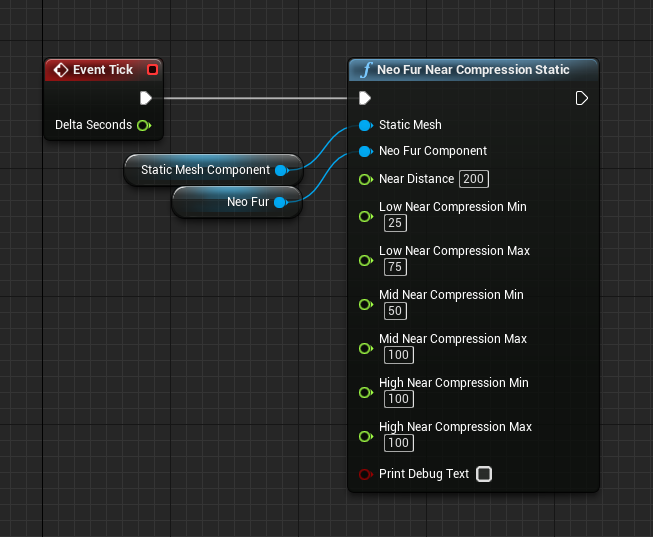
Using r.detailmode
The Compression blueprint function has functionality for scaling the amount of fur based on the r.detailmode variable. This is an existing engine variable that you can read more about in Unreal 4's documentation, but it would allow you to increase the compression applied to your NeoFur Component based on the detail setting of the user.
Alternatively, as we do in the demo hall, you could use the detail mode for things like triggering a lower detail mode for VR.
Customer support service by UserEcho